Free 3D aquascape builder: design your tank online
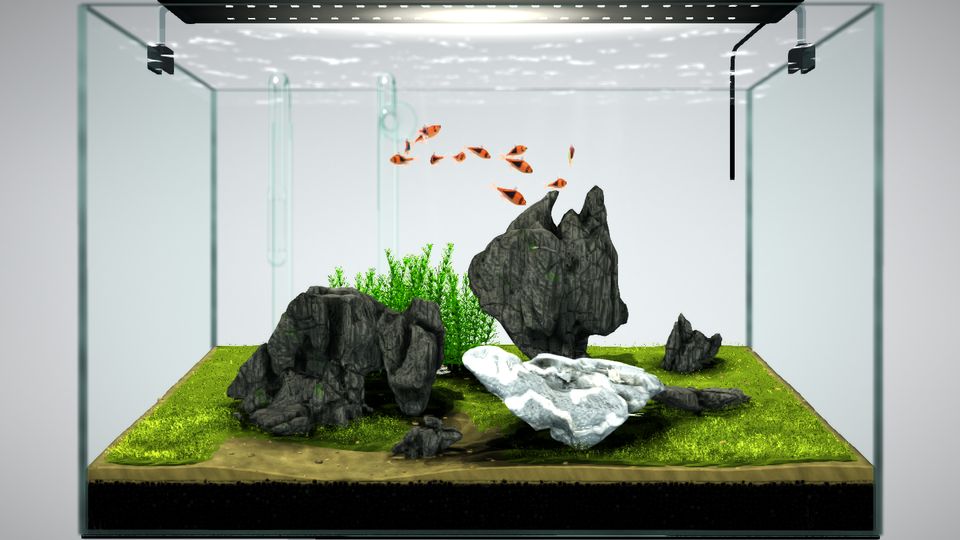
An aquascape builder is a program that lets you lay out a planted tank on screen before you spend money on it. MOKIZEN is a free one that runs in your browser in 3D: you place plants, moss, stones, driftwood, lamps and fish, watch the planting grow on a 90-day timeline, then share the design by link. No download is needed.
| Where it runs | In the browser, nothing to install |
|---|---|
| Price | Free; Pro is optional |
| Builds | Planted aquariums, terrariums, paludariums, miniature landscapes |
| Styles | Iwagumi, Dutch, jungle and nature layouts |
| Growth preview | 90-day timeline |
| Output | Shopping list, share link, image or video, AR view |
What does an aquascape builder do?
It lets you try a layout before you build it. You can move a stone, swap a plant or change the light and see the result at once, instead of finding out after the tank is filled. Some people call the same kind of tool an aquascape planner, simulator or designer; the idea is the same: plan first, buy second.
How do you design an aquascape in 3D with MOKIZEN?
You work in a 3D editor in the browser. The steps below are the whole loop, from first idea to a design you can show someone.
- Start from a ready-made tank, from a text description (AI), or from an empty tank.
- Add and arrange plants, moss, stones, driftwood and fish in the 3D editor.
- Add lamps: they cast light shafts and tint each area below them.
- Check each species in the care guide and get a shopping list of everything you used.
- Share by link, export an image or video, or view the result in AR.
Which kinds of tanks can you build?
Not only freshwater planted tanks. The same editor covers several kinds of living world.
- Planted aquariums in Iwagumi, Dutch, jungle and nature styles, with fish swimming through them.
- Terrariums and wabi-kusa: moss scenes, glass jars and gardens in a bottle.
- Paludariums and ripariums: half-land, half-water tanks with a waterfall and emersed plants.
- Miniature landscapes: zen gardens, old pagodas, bonsai and dioramas.
Which aquascape style should you start with?
Start with a low-tech jungle or a simple nature layout, and leave Iwagumi and Dutch for later. Our guides rate a low-tech jungle as easy to moderate, while Iwagumi and Dutch are demanding: Iwagumi is bright and open, so it is prone to algae early on, and one Dutch example build needed up to about 3 hours of care a week.
Because the builder is free, you can try several layouts before you commit to one.
How do you turn the design into a real tank?
Use the shopping list for what to buy, and the species care guide for light, temperature and pH of each plant and animal. Before you add livestock, cycle the tank: the cycling guide explains how.
The shopping list is built from the items in your design, so it matches what you placed.
Is it really free, and do you need an account?
Yes, it is free and it runs in your browser, with nothing to download. You can open the editor and start designing without an account; saving to your account and the AI generator need you to sign in. There is an optional Pro plan for people who want more.
Is an aquascape builder the same as a planner or simulator?
In practice the names overlap. A planner stresses layout and shopping lists, a simulator stresses how the tank behaves over time, and a builder stresses placing things in 3D. MOKIZEN does all three in one place: you build in 3D, preview growth over 90 days and get the list of what to buy.
Plants and animals in this guide
- Dwarf Hairgrass (Eleocharis) (Eleocharis pusilla (sold as E. parvula / 'Mini') / E. acicularis)
- Monte Carlo (Micranthemum) (Micranthemum tweediei 'Monte Carlo' (WCVP: syn. of M. umbrosum))
- Java Fern (Microsorum pteropus (syn. Leptochilus pteropus))
- Anubias nana 'Petite' (Anubias barteri var. nana 'Petite')
- Bucephalandra (Buce) (Bucephalandra spp.)
- Cryptocoryne (Crypt) (Cryptocoryne wendtii)
See it in 3D
Related guides
- Jungle aquascape: plants, layering and setup
- Nature Aquarium style: layout rules and setup
- Iwagumi aquascape: stones, plants and setup
- Dutch aquarium style: plant streets and rules
- Nitrogen cycle in an aquarium: how to cycle a new fish tank
- Paludarium: how to build a half-land, half-water tank
Written from these sources; last updated .
Explore living worlds · Species care guides · Aquascaping guides · What 591 real aquascapes use · 3D aquarium live wallpaper · Open the 3D editor